Secure Partner Data Sharing Portal
completed
30-second summary
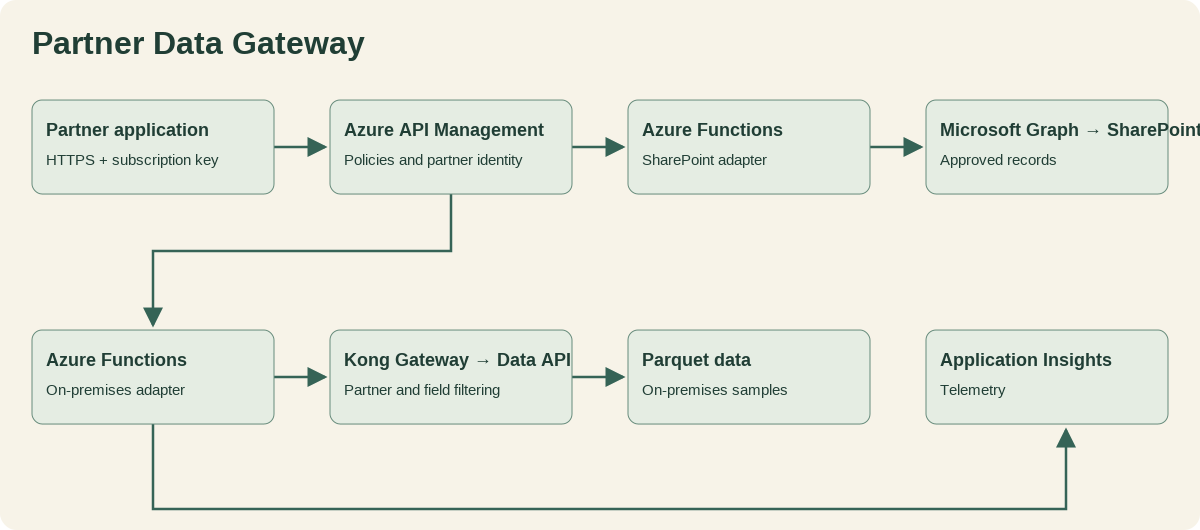
A secure way to share approved data from two main data flows, cloud and on-premises, with external partners through Azure API Management and Azure Functions: each partner has its own subscription key, and an Azure Function returns only the records and fields that partner may see. Built at HPT in two phases; both are complete.
Handling each request by hand is slow and error-prone, with no record of who received what data, when or how often. Direct access can expose internal URLs, structure and out-of-scope data. Four risks: a partner seeing another partner's data, exposure of internal sources, difficulty revoking access when a partnership ends, and no visibility into who calls what.
Cloud & DevOps intern at HPT; presenter of the phase 1 proof of concept.
Lab · demo — A public demo simulates the Secure Partner Data Sharing Portal. Demo only; does not represent a production system
Context and problem
Partners and internal staff need to look up approved data. The data comes from two main flows, cloud and on-premises, and giving partners direct access to the sources was judged risky. Work done during Duy's internship at HPT, from July 2026. Duy approves what is published.
Handling each request by hand is slow and error-prone, with no record of who received what data, when or how often. Direct access can expose internal URLs, structure and out-of-scope data. Four risks: a partner seeing another partner's data, exposure of internal sources, difficulty revoking access when a partnership ends, and no visibility into who calls what.
Individual role
Cloud & DevOps intern at HPT; presenter of the phase 1 proof of concept.
Created an individual APIM subscription and key per partner; developed an Azure Function that reads the approved data and filters it by partner ID; implemented rate limiting, correlation IDs, key rotation and subscription revocation; tested authentication, error handling and isolation between partners (per Duy's CV). Phase 2, with a Kong gateway and an on-premises data service, was completed as well.
Constraints
Phase 1 scope: a REST API returning JSON, APIM subscription-key authentication and an Azure Function backend on .NET 8 (isolated). Phase 2: the API Management tier has no Developer Portal or Groups, and the on-premises server is small and shared with existing services, so the new stack must not disturb the existing API and gateway.
Architecture
Data from the two main flows, cloud and on-premises, is shared with partners in a controlled way through Azure API Management and Azure Functions. The partner holds only the APIM URL and a subscription key. APIM checks the key and identifies the partner; an invalid key stops at APIM with 401. The Function filters records and fields and normalises the data, so records not belonging to the partner are dropped there and the partner never sees internal sources, identifiers or tokens. Phase 2: partner, APIM, Azure Function, Kong gateway on-premises, a data API reading sample Parquet files. Partner identity travels in a JWT (partner ID plus the APIM subscription ID) checked against the real subscription; permission profiles shared per APIM Product define datasets and allowed fields; separate internal keys protect each hop.
Decisions and alternatives
Every partner request goes through APIM, with no exception; APIM never reads the data sources, the Function does. One independent subscription per partner so revoking one does not affect the others. Seven security layers: gateway key, subscription-to-partner mapping, APIM policy (overwrite internal headers, correlation ID, rate limit), partner check and mandatory filtering in the Function, field-allowlisted responses, least-privilege access to the data sources, and operations (monitoring, alerting, periodic rotate/revoke). Phase 2 groups partners by identical permission sets (Product plus shared profile) instead of one Product per partner, and the field list is an explicit allowlist, never a wildcard.
Rejected: granting partners direct access to the data sources, and manual per-request sharing. OAuth/Entra tokens for partners were left to a later stage; phase 2 chose a self-issued JWT instead of an Entra app registration.
Implementation
Twelve steps: identify the data source, create the application identity, grant least-privilege permissions, create, deploy and test the Function App, create APIM and integrate the Function, then Product, Subscription and acceptance testing. Partner key lifecycle: create, distribute, rotate, revoke. Phase 2 added the gateway and data service on-premises beside the existing API without changing it.
Validation
Acceptance list: a valid key returns 200; a missing or wrong key returns 401; Partner A cannot see Partner B's data (achieved, per Duy); backend errors do not leak tokens or internal errors; no internal URL or identifier is exposed; JSON format is consistent; a suspended subscription is rejected; an unknown request returns 404; going over the limit returns 429. Key rotation and revocation are done.
Results and evidence
Phase 1 worked end to end: the endpoint returned 200 and the test partner received exactly the 2 records assigned to it. Phase 2 (Kong, on-premises) is complete according to Duy. Latency, volume, cost and adoption were not measured. The public repository is a demo with mock data, not the company system.
Lab · demo — A public demo simulates the Secure Partner Data Sharing Portal. Demo only; does not represent a production system
Limits and lessons — If I did it again
Being allowed to read a column does not mean two partners may read each other's rows; the source schema and the publishing permission are separate steps.